
Microsoft Solitaire Collection
Microsoft CorporationCard
3.929.07K Reviews
- Version
- 4.26.8201.1
- Installs
- 10.00M
- Age Rating
- Everyone
Screenshots

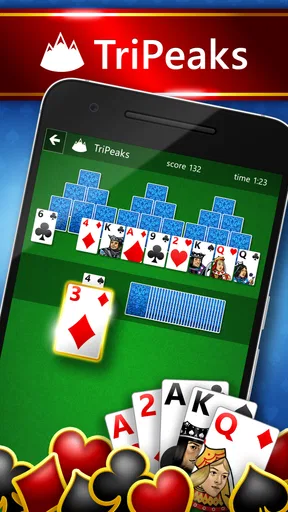
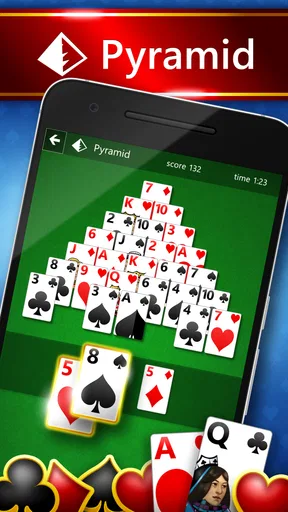
Our Review of Microsoft Solitaire Collection
 Analysis by Appyee
If you've ever found yourself with a few spare minutes and a yearning for a classic card game, you've probably stumbled across the Microsoft Solitaire Collection. This app bundles together five of the most beloved solitaire card games, offering a nostalgic trip down memory lane with a modern twist. Let's dive into what makes this app a must-have for both casual gamers and solitaire enthusiasts.
What the first move feels like
Microsoft Solitaire Collection is a free card game from Microsoft Corporation, and I find its appeal easiest to understand by starting with the first decision: choosing a familiar game rather than learning an unfamiliar ruleset. Klondike, Spider, FreeCell, Pyramid, and TriPeaks give the collection several different ways to spend a short break. The game is rated for Everyone, and its broad mix makes it approachable for a household where players may want very different levels of difficulty.
That range is useful in practice, not just on paper. If I have only a little time, TriPeaks or Pyramid makes a good quick choice; if I want to think carefully, Spider or FreeCell gives me more to work through. I would not treat every mode as equally relaxing, though. A game that asks for planning can turn a brief pause into a longer concentration exercise, so I choose based on whether I have time to finish and attention to spare.
Game Selection and Features
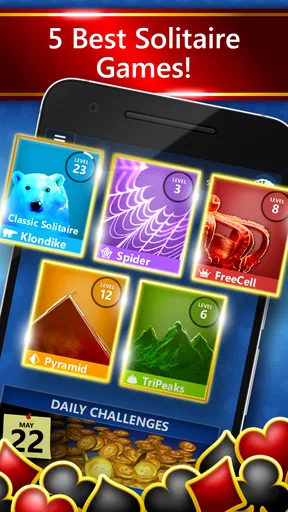
Opening up the Microsoft Solitaire Collection, you're greeted with a sleek interface that feels both familiar and fresh. The collection includes five timeless games: Klondike, Spider, FreeCell, Pyramid, and TriPeaks. Each game comes with a set of challenges and difficulty levels to keep things interesting.
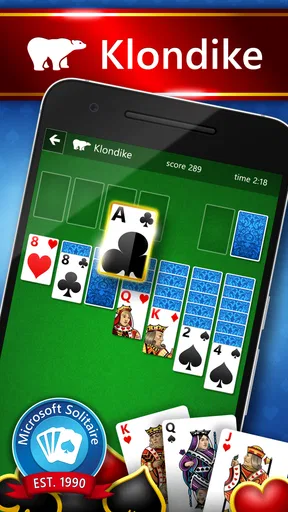
Klondike is the traditional solitaire game that many of us grew up with. It's the classic "draw one" or "draw three" game, where the goal is to build the four foundation piles, sorted by suit. It's perfect for those who enjoy a straightforward challenge.
A practical way to enjoy Klondike is to decide before starting whether I want a gentler pace or a tougher one: draw-one play is easier to follow, while draw-three makes me think harder about the order in which cards appear. That small choice changes the feel of a familiar game without requiring a new set of rules. When I want to relax rather than chase a perfect run, I focus on making sensible moves instead of restarting as soon as the deal becomes awkward.
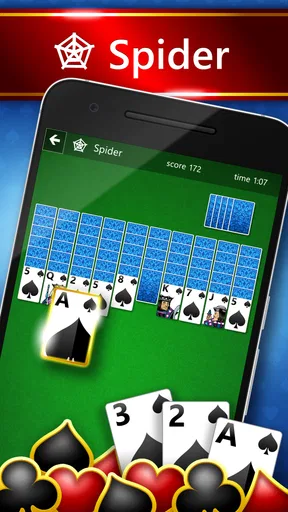
Then there's Spider Solitaire, which offers a bit more complexity. With its multiple suit options, it provides a deeper strategy component. Personally, I find it incredibly satisfying to clear those stacks and watch the cards cascade away.
Spider is the mode I would pick when I want a puzzle that develops over several moves. A useful habit is to uncover hidden cards when there is a reasonable opportunity, rather than making a move simply because it clears space. Empty columns can be valuable, but using one too early may leave me without a useful place to rearrange a sequence. This is where the game feels less like a quick card shuffle and more like managing options: sometimes the best move is the one that keeps a future move possible.
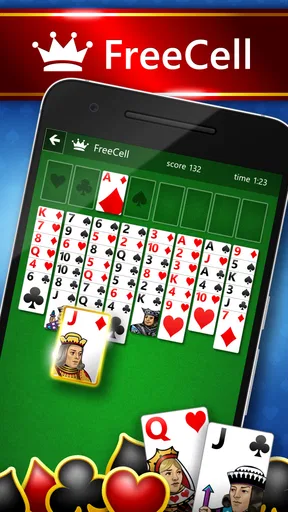
For those who love a good puzzle, FreeCell is the way to go. This version requires strategic planning from the get-go, and every game is winnable, which makes it both challenging and rewarding.
FreeCell is especially suited to players who like to see the consequences of a decision. I try to treat the free cells as temporary parking spaces, not as places to store cards indefinitely; filling them too quickly can box in the next sequence I need. That little bit of restraint makes the planning more satisfying. If I want something nearly automatic while doing another task, FreeCell is not my first choice, because its appeal depends on paying attention to the board.
Pyramid and TriPeaks are more about clearing the board than stacking cards. Pyramid requires matching two cards that add up to 13, while TriPeaks involves clicking cards in sequence. These are great for a quick game when you don't have much time.
Their quicker rhythm also makes them handy when I am waiting for a kettle to boil or sitting through a short pause between errands. I still avoid opening a new round when I know I will need to put my phone away immediately: a quick mode is convenient, but it does not make every interruption feel graceful. For a player comparing this collection with a single-mode solitaire app, the advantage here is variety; the trade-off is having more choices and challenges to navigate than a bare-bones game needs.
How the feedback keeps a session moving
The satisfaction here comes from seeing the board change after a move: a sequence opens, a card becomes available, or a run is cleared. Those small outcomes make the next decision feel earned rather than arbitrary. In the more tactical modes, I enjoy the pause before moving because I can weigh whether a move solves the immediate problem or preserves a better option for later. In the faster modes, the simple rhythm of selecting a card and watching the available sequence change is enough to make a spare minute feel occupied.
That rhythm is not always smooth. A deal can leave me with few appealing choices, and a challenge can feel like a task if I approach it as something I must complete rather than an optional reason to play. I get more enjoyment by treating a frustrating round as a chance to try another approach, not as proof that I need to keep going until I win. The collection works best when I am comfortable ending a session without resolving every board.
Daily Challenges and Rewards
The daily challenges are a brilliant addition. They offer a reason to come back every day, with each challenge rewarding you with badges and points. This feature adds a competitive edge, especially when you're aiming to climb the leaderboards.
For me, the useful part is having a ready-made goal when I do not want to choose a mode or invent a reason to play. I can make a short routine of trying a challenge during a break, then stop when that is enough. Badges and points can make progress visible, but they are most enjoyable as a record of play rather than a duty to return. If keeping a streak or completing every available task tends to make games feel like homework, I would ignore that pressure and play the modes I actually like.
There are also events and themes that change regularly, which is a nice touch. It keeps the app feeling fresh and gives players something to look forward to each month.
The reward loop is simple: choose a game or challenge, make moves, see whether the board opens up, then take the result as a small win or a prompt to try again. A completed round gives the session a natural stopping point, while an unfinished one can make me curious about a different approach. That is the reason another session begins for me: not a need to grind, but the chance to solve a fresh arrangement or pick a different kind of card puzzle.
Interface and Usability
The app's design is clean and intuitive, making it easy to navigate between games and settings. The graphics are crisp, and the animations are smooth, enhancing the overall experience. Whether you're playing on a phone or a tablet, the game adapts well to different screen sizes.
One of my favorite features is the customization options. You can change the card backs and themes to suit your mood, which adds a personal touch. Plus, the sound effects are subtle and not intrusive, allowing you to focus on the game.
For everyday use, I like to settle on a comfortable card appearance and sound level before starting a longer session, instead of fiddling with presentation between rounds. Customization is a pleasant extra, but it does not change the underlying rules or make a difficult deal easier. On a small screen, I also find it sensible to slow down and check the full board before tapping; a fast move can be easy to regret when the game depends on sequence and planning.
The collection is available on Android, with a minimum operating-system requirement of version 7.0. Its current version is 4.25.1132.1, and it has been released since November 22, 2016. Those details make it a long-running option for people who want a familiar card game on a supported device, though I would still check that my own phone meets the system requirement before installing. With a 4.0 average from around 280,000 ratings and over 10 million installs, it is clearly a widely used choice, but popularity does not mean every player will prefer its multi-game approach.
Who will enjoy this collection, and who may prefer something else
I would recommend it to someone who likes traditional solitaire but gets bored when one ruleset is the only option. Having five recognizable games means I can switch from the sorting and sequencing of Klondike to the more deliberate planning of FreeCell without leaving the same collection. It also suits casual players who like optional goals and a little sense of progress, as well as experienced solitaire fans who want several familiar formats close at hand.
On the other hand, a person who wants a minimalist, single-game experience may be happier with a simpler solitaire app. The collection’s challenges, events, and multiple modes add choice, but that choice can feel like clutter if all I want is one plain game with no additional prompts. Likewise, anyone who dislikes interruptions or visible monetization should weigh the free experience carefully before settling in for a long run. A dedicated card game with fewer extras may be a better fit for that preference.
A realistic use case for me is a short wait before an appointment: I choose a quick round, play until I am called, and leave the app rather than trying to force a full session into the gap. At home, I am more likely to choose Spider or FreeCell when I can give the board my attention. That distinction helps keep the game enjoyable: the collection can serve both moments, but the mode should match the time and focus I actually have.
Monetization and Ads
Now, let's talk about the elephant in the room: ads. Yes, the free version of the app comes with ads. They can be a bit annoying, especially when you're on a roll and an ad pops up. However, you can opt for the premium version, which removes ads and offers additional features like extra card themes and an ad-free experience. If you're a regular player, it might be worth the investment.
The game is free to download, with optional in-app purchases ranging from $0.99 to $9.99 per item. I would first play enough to learn whether I return to it regularly before spending anything. If ads disrupt the particular way I use it, paying for an ad-free experience may be worthwhile; if I only open it now and then, the free option may be sufficient. I would not buy extra presentation options expecting them to improve the card-solving itself: their value is personal, not strategic.
Final Thoughts
All in all, the Microsoft Solitaire Collection is a fantastic app for anyone who enjoys solitaire. It blends nostalgia with modern gaming elements, making it appealing to both old-school fans and new players. The variety of games and daily challenges provide endless entertainment.
Whether you're looking to kill time or engage in a serious card game strategy session, this app has got you covered. So, if you're ready to relive the classic card game experience or discover it for the first time, give the Microsoft Solitaire Collection a try. You won't regret it!
My more measured verdict is that the collection is strongest when I use its variety deliberately: quick modes for a short pause, deeper ones when I can concentrate, and challenges only when I want an extra goal. It is not the right pick for someone who wants a completely bare, interruption-free solitaire table without optional systems around it. But for a free, familiar set of card games that can shift from casual to thoughtful, I find the loop easy to return to: make a move, read the board’s response, enjoy a small reward, and decide whether I want one more round.
Verdict
Strengths of Microsoft Solitaire Collection
- Wide variety of solitaire games.
- Daily challenges boost engagement.
- Clean, intuitive user interface.
- Syncs progress across devices.
- Offers rewarding achievements.
Limitations of Microsoft Solitaire Collection
- Contains in-app advertisements.
- Some features require a subscription.
- Occasional performance lags.
- Limited offline functionality.
- Frequent pop-ups for purchases.
Other Releases by Microsoft Corporation
View All
Microsoft OneDrive
Productivity4.6

Microsoft OneNote: Save Notes
Productivity4.6

Link to Windows
Productivity4.0

Microsoft PowerPoint
Productivity4.8
Similar Picks in This Category
View All
Solitaire - Classic Card Games
MobilityWare4.6

UNO!™
Mattel163 Limited4.3

Spider Solitaire: Card Games
MobilityWare4.6

Solitaire.com - Classic Cards
Tripledot Studios Limited4.7

Plants vs. Zombies™ Heroes
ELECTRONIC ARTS4.1

Hearthstone
Blizzard Entertainment, Inc.4.1
Frequently Asked Questions
What is Microsoft Solitaire Collection?
Microsoft Solitaire Collection is a comprehensive app that brings together several classic solitaire games, including Klondike, Spider, FreeCell, Pyramid, and TriPeaks. It offers both casual gameplay and daily challenges, making it suitable for both new players and solitaire enthusiasts. The app is available on both Android and iOS platforms.
Is Microsoft Solitaire Collection free to play?
Yes, Microsoft Solitaire Collection is free to download and play. However, it includes optional in-app purchases and advertisements. Players can choose to purchase a subscription to remove ads and unlock premium features, enhancing the overall gameplay experience.
What features does Microsoft Solitaire Collection offer?
The app provides a variety of features, such as a daily challenge mode, various card themes, and the ability to sync progress across devices. It also includes a rewarding system for completing challenges and achievements, and features like the Star Club for additional puzzles and incentives.
Does Microsoft Solitaire Collection require an internet connection?
While Microsoft Solitaire Collection can be played offline, some features, such as daily challenges and progress syncing, require an internet connection. Playing offline limits access to these features, but the core solitaire games remain accessible without connectivity.
Can I customize the appearance of the cards and background in Microsoft Solitaire Collection?
Yes, Microsoft Solitaire Collection offers customization options for both card decks and backgrounds. Players can choose from various themes to personalize their gaming experience. Some themes might require unlocking through gameplay or purchasing, adding a layer of personalization to the app.
Play our best games!


